|
This tutorial will help you install SolSuite on your P.C. with confidence. Installing
SolSuite is a simple process!
1
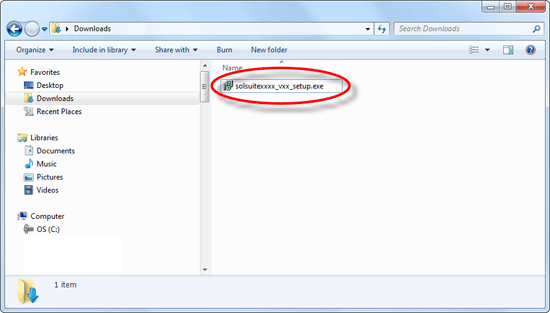
Double click on the
"solsuitexxxx_vxx_setup.exe"
(or solsuite.exe) file to
start the installation.
If you cannot
locate the "solsuitexxxx_vxx_setup.exe"
(or solsuite.exe)
file:
-
Open the folder where you downloaded SolSuite. The default folder is "Downloads".
-
OR insert the
CD-Rom containing SolSuite (if you bought it);
-
you can always
download SolSuite again:
click
here for more info.
2
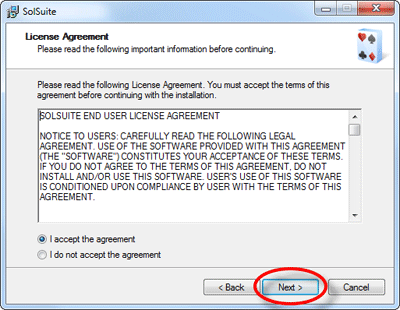
The installation program will be
displayed. Press "Next"
to continue. A series of dialog boxes will
be displayed. Press
"Next" to continue the
installation.
(On this Tutorial page we'll display only the most important dialog boxes.)
3
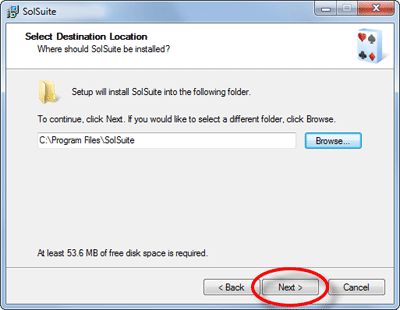
Select the Folder for installing SolSuite. We recommend maintaining the default folder.
Note: If you are
installing a SolSuite upgrade:
- select the
"Destination Folder"
that contains your previous
installation of SolSuite;
- Install the new SolSuite upgrade without uninstalling the previous version, which will save your statistics and settings.
4
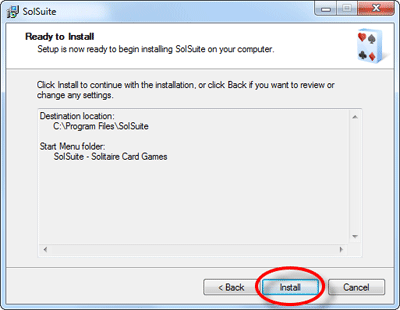
Now you are ready to begin the
installation. To start copying the files on your
P.C., press
"Next".
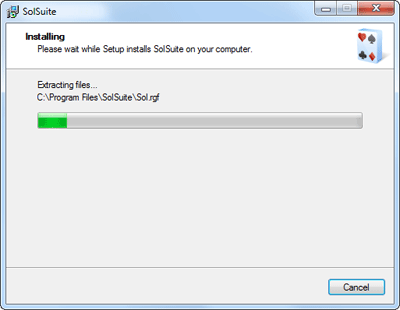
5
The installation program starts
copying the files on your
P.C.
6
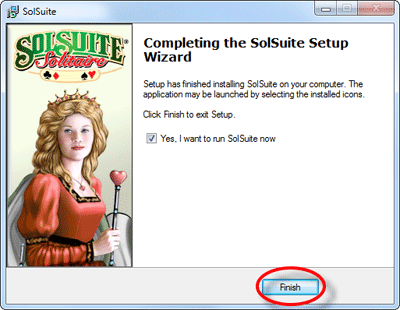
After
SolSuite has been successfully
installed on your P.C., press
"Finish" to exit the
installation.
If the check-box
"Yes, I want to run SolSuite
now" is checked, then
SolSuite will open immediately.
7
To run SolSuite you can choose one
of the following ways:
Click
on the "SolSuite"
icon on the Windows Desktop:

or:
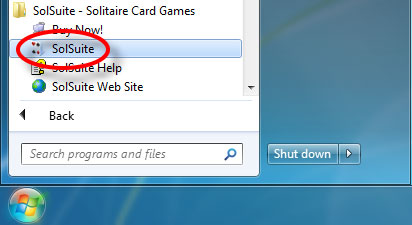
- click on the Windows
"Start" button;
- click on "All Programs";
- click on the "SolSuite -
Solitaire Card Games" folder;
- click on the "SolSuite" icon.
8
Now the SolSuite installation
process is finished. You are ready to
enter the Activation Code.
Click
here to go to the Activation Code
tutorial.
|